Team chat for focused work

Team chat that keeps work in order.

Tandly gives your team channels, threads and nested folders in one calm, quick workspace — so today’s conversation is still easy to find next year.

  • Sign in with Google
  • Google Workspace directory sync
  • Free for up to 10 people
  • Stored in the EU
Tandly on a phone: the #launch channel of Acme Inc. with a mention, a pinned message with a thread summary, and reactions.

Organized by default

Folders, threads and saved items keep the noise down and the important things one click away.

Connected to your directory

People, groups and reporting lines come straight from Google Workspace and stay current on their own.

Made in the EU

Built by a Slovak company. Your messages and files are stored in the EU, under a DPA you can read before you sign up.

Features

Built for the way teams actually work

Everything you expect from team chat — and a few things you'll wonder how you managed without.

Channels & folders

A sidebar that finally stays tidy

Group channels and DMs into folders, nest them up to four levels deep, and drag things to where they belong. Collapsed folders roll up their unread and mention counts, so nothing slips past — and muting a folder quiets everything inside it.

  • Nested folders, up to four levels
  • Unread and mention roll-ups on collapsed folders
  • Drag & drop, per-folder colours and sorting
  • Starred, muted and hidden conversations
Sidebar with a Product folder containing a Launch Q4 subfolder with #launch and #press-kit, a Customers folder whose collapsed Enterprise subfolder shows one unread mention, and direct messages below.

Threads & reactions

Conversations that stay on topic

Reply in a thread without derailing the channel, and send the reply that matters back to everyone with one checkbox. Pin what matters and bookmark the links everyone keeps asking for.

  • Threads with “also send to channel”
  • Reactions, including your own custom emoji
  • Mentions for people, groups, @here and @channel
  • Pins, bookmarks, drafts and scheduled messages
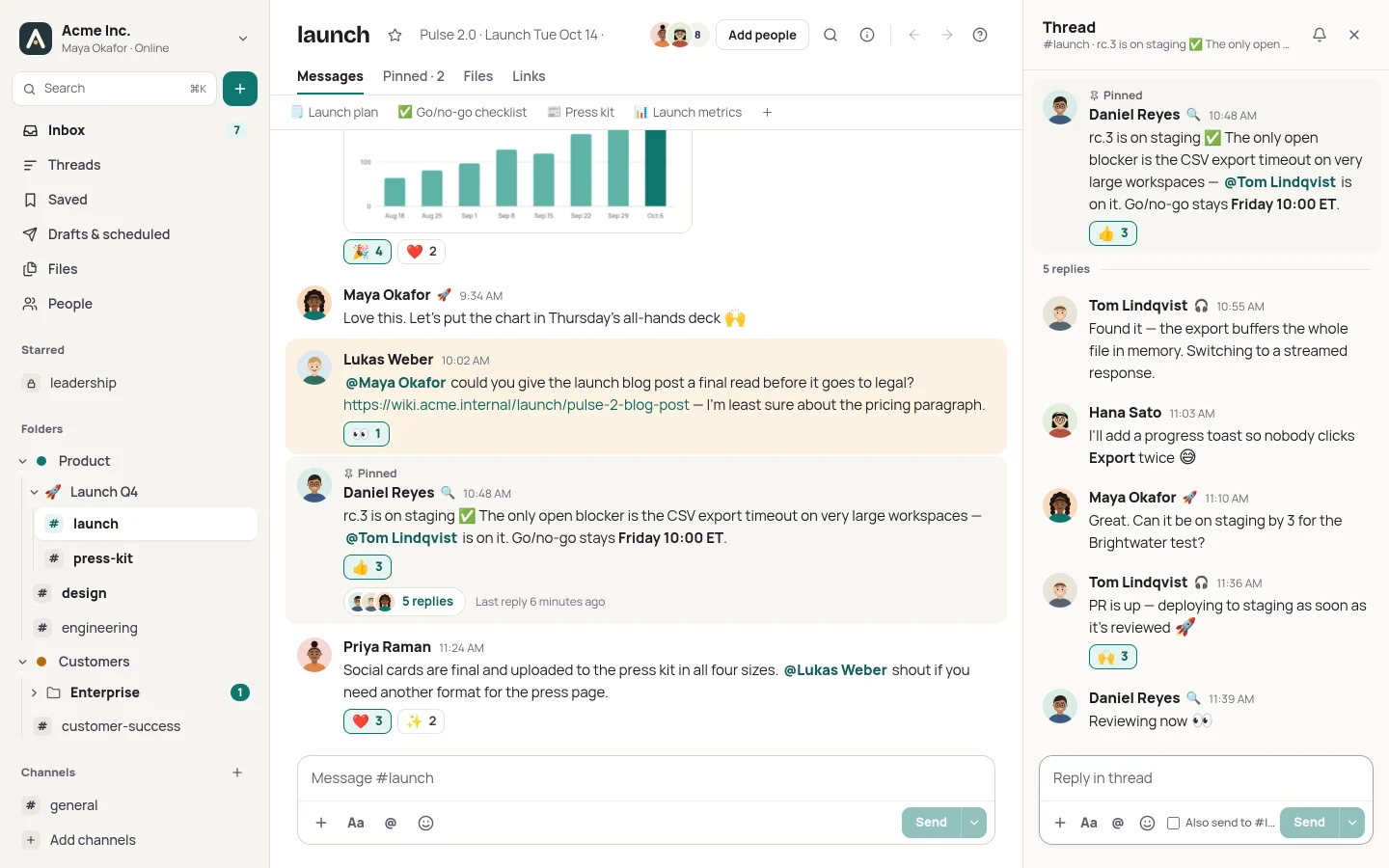
Messages in #launch: a mention of Maya, a pinned message from Daniel with a thumbs-up reaction and a “5 replies” thread summary, and Priya’s message with heart and sparkles reactions.
The thread side pane: Daniel’s message about the release candidate and replies from Tom, Hana and Maya.

Tandly Bot

A bot that helps, then gets out of the way

Tandly Bot messages you about the things that need you: reminders you set with /remind, messages you saved for later, changes to your channels and your role. Act on them right in the message — mark complete, or snooze for twenty minutes, an hour or until tomorrow.

  • Reminders with one-click snooze
  • Saved-for-later nudges
  • Heads-ups when you're added to or removed from channels
  • A note when a scheduled message couldn't be sent, with retry
A direct message from Tandly Bot with a welcome note and two reminders, each with Mark complete, Snooze 20 min, Snooze 1 hour and Tomorrow buttons.

Profiles & org chart

Know who you're talking to

Profiles show title, department, location, local time and pronouns — plus who someone reports to and who reports to them. Admins can add their own fields, and anything that comes from your directory stays locked and up to date.

  • Reporting lines and direct reports
  • Departments, locations and start dates
  • Custom fields: text, links, dates, people, pick-lists
  • Statuses, presence and Do Not Disturb
Daniel Reyes’s profile: Head of Engineering in Austin, TX, with his status and local time, work details, a reporting line to Elena Marsh and direct reports Hana Sato and Tom Lindqvist.

Search & ⌘K

Press ⌘K to jump to any channel, person or conversation. Full-text search understands filters, so the message you half-remember is only a few keystrokes away.

  • from:@lukas
  • in:#launch
  • has:link
  • is:thread
  • before:friday
  • during:month
The ⌘K palette searching for “design”: the #design channel, Priya Raman, and options to search messages, with filter chips for from:, in:, has:link and dates.

Appearance

Make it feel like yours

Two looks — Daylight and Slate — each in light and dark, and a compact density for people who like to see more at once. Workspaces can set their own accent colour and logo.

Tandly in the Daylight look, light mode.

On the go

Right there on your phone

Tandly is a responsive web app, so the same channels, threads and folders work on a small screen — with web push notifications that respect Do Not Disturb and your per-channel settings.

The sidebar on a phone, with folders and unread badges.
A channel on a phone, with messages, reactions and a thread summary.

Only in Tandly

Things other chat apps don’t do

Small features that take a lot of noise out of the day. Most of them are on every plan, Free included.

Every plan

“Since you were away”

Back after a day off? One page shows what you missed — mentions, DMs, decisions and open questions — instead of every channel at once. Built from what you’ve read, not guessed.

Every plan

Send when they’re back

Write at eleven at night, deliver at nine in the morning. Messages to someone outside their working hours can wait until their day starts.

Every plan

A decision log in every channel

Mark any message as a decision. Each channel keeps a list of what was decided, by whom and when, next to the discussion. Questions stay open until someone answers them.

Team and up

Handover while you’re away

Going on holiday? A stand-in covers your mentions and DMs, and you come back to a summary of what they handled.

Team and up

Mentions that know your org chart

@my-manager, @my-team, @department:Sales — worked out from your Google directory when you send, so they’re never out of date.

Every plan

A guard for secrets

Paste a password, API key or private key and Tandly warns you before it’s posted. Admins can make it block instead.

Every plan

Channels that tidy themselves

Channels for an event or an incident archive themselves on the day you choose, with a reminder the day before and a wrap-up at the end.

Business

“I’ve read this”

Ask people to confirm they’ve read an announcement that matters, and see who has and who hasn’t — without chasing anyone by hand.

Every plan

You see when we look

Every action Tandly Support takes on your workspace shows up in a log your admins can read. Nothing happens behind your back.

For IT & admins

Your directory. Your rules.

Sign-in and people come from Google Workspace, and the settings that matter stay in your hands.

Sign in with Google

OpenID Connect with PKCE. Limit sign-in to your Google Workspace domains — personal Google accounts are turned away.

Directory sync

Users, titles, departments, managers, locations and Google Groups (as @handles) sync on a schedule. Suspended or deleted people are deactivated and signed out.

Roles & audit log

Owners, admins, members and guests. Role changes, invites, deactivations, directory syncs and profile-field edits are written to an audit log.

Webhooks, bots & commands

Incoming webhooks, bot users with API tokens, and custom slash commands whose requests are signed with HMAC-SHA256.

Security & privacy

Careful defaults, built in

Your messages and files are stored in the EU. Here's how Tandly looks after them, and what we promise in the DPA.

  • Server-side sessions

    Opaque session tokens, stored only as SHA-256 hashes, in HttpOnly SameSite cookies. See your active sessions and sign out of one device or all of them.

  • CSRF protection

    Every state-changing request must carry a custom header that browsers won't attach cross-site, on top of SameSite cookies.

  • SSRF-safe link previews

    Link previews and outgoing calls to slash commands check every address at connection time — private, loopback and link-local networks are off limits.

  • Private files

    Files are served only after an access check, through signed links that expire after five minutes. Downloads proxied by the server run in a sandbox.

  • Rate-limited integrations

    Incoming webhooks and the bot API are rate-limited per webhook and per token. Tokens and signing secrets are shown once.

  • Your directory decides

    Fields managed by Google Workspace can't be changed in the app, and deactivated people lose their sessions.

Switching

Moving is the easy part

People come from your Google directory, channels are ready before anyone arrives, and if you’re still under contract with another chat tool, Tandly is free until it ends.

  1. 1Bring your people from Google Workspace
  2. 2Lay out channels and folders
  3. 3Send the team one short note
  4. 4Overlap for a week, then close the old tool

Pricing

Pay for the people who use it

Simple per-seat pricing, with a 14-day trial on paid plans. Every plan keeps your full message history and search, Free included.

Billing period
Currency

Free

For small teams getting started.

$0$0€0€0forever

For up to 10 active members

Start free

Includes

  • Up to 10 active members
  • Full message history and search
  • Two-factor authentication
  • Channels, DMs, threads and files
  • Nested folders, reminders and scheduled messages
  • Up to 10 apps, webhooks and commands
  • 5 GB of storage per workspace

Team

For growing teams that work together every day.

$4$5€4€5per user per month

Billed annually · $48€48 per user/yearBilled monthly · excl. VAT

Start with Team

Everything in Free, plus…

  • As many seats as you need
  • 10 GB of storage per seat
  • Guest accounts for clients and partners
  • Custom emoji and @groups
  • Unlimited apps, webhooks and slash commands
  • Email support

Recommended

Business

For organizations that run on Google Workspace.

$8$10€8€10per user per month

Billed annually · $96€96 per user/yearBilled monthly · excl. VAT

Start with Business

Everything in Team, plus…

  • Google Workspace directory sync
  • Custom profile fields
  • Your accent colour and logo
  • Audit log
  • 20 GB of storage per seat
  • Priority email support and 99.9% uptime
  • Admin data export

Enterprise

For large or regulated organizations.

CustomCustomCustomCustom

From $12€12 per user/month · billed annually · excl. VAT

Contact sales

Everything in Business, plus…

  • SAML single sign-on and SCIM
  • Retention policies Planned
  • Data residency Planned
  • Dedicated instance Planned
  • Custom storage
  • Dedicated account manager and 99.95% uptime
  • Full history on every plan
  • 14-day trial, no card needed
  • Change seats whenever you need
Compare every feature

Guides

Practical notes on team chat

All guides

Give your team a calmer place to talk.

Start free, invite the team this afternoon, and move to a paid plan only when it earns it.